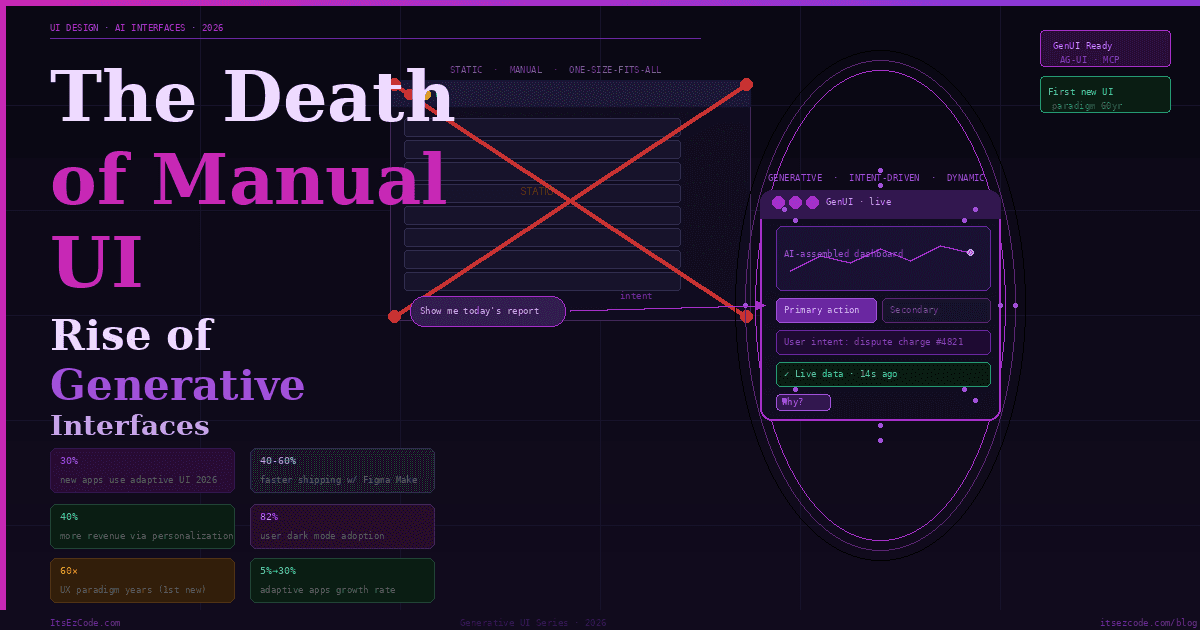
The Death of "Manual" UI: The Rise of Generative Interfaces in 2026
Think about the last time you used a banking app. You opened it to dispute a charge. You navigated: Menu → Support → Claims → Transaction History → Filter → Select → Dispute. Six steps to do one thing you knew exactly you wanted to do.
Now imagine the app opened, detected from your recent behavior that you were probably there about that suspicious transaction from Tuesday, and rendered a single bespoke micro-interface: the transaction, your account balance, and one big "Dispute" button. Task complete. Interface dissolves.
That's not science fiction. That's the shift Jakob Nielsen — the godfather of UX — is calling the first new UI paradigm in 60 years. And it's arriving in 2026.
2026 is the year we start the shift to Generative UI. Software interfaces are no longer hard-coded — they are drawn in real-time based on the user's intent, context, and history. Gartner predicts 30% of all new apps will use AI-driven adaptive interfaces by 2026, up from under 5% two years ago. Google has already shipped generative UI inside Gemini and AI Mode in Search. Interfaces from generative UI implementations are strongly preferred by human raters compared to standard LLM outputs.
For MERN and Next.js developers, this is not a trend to watch from a distance. It is a fundamental change to what "building a UI" means — and the practical toolkit for doing it is already here.
What Generative UI Actually Is
There's a lot of noise around "AI-powered interfaces" that confuses chatbots bolted onto existing apps with genuine generative UI. The distinction matters.
A chatbot inside your app is still a static interface — the same chat window for every user, regardless of context. That is not generative UI.
Generative UI is the idea that allows agents to influence the interface at runtime, so the UI can change as context changes. The interface itself is an output of the AI — not the container the AI lives inside.
A generative UI is a user interface that is dynamically generated in real time by artificial intelligence to provide an experience customized to fit the user's needs and context. Currently, interfaces must be designed to satisfy as many people as possible. Any experienced design professional knows the major downsides with this approach — you never make anyone perfectly happy.
The most significant trend in 2026 is the rise of Generative UI. Traditional applications rely on static menus. A banking app has the same buttons for every user, regardless of their needs. Generative UI changes this. The AI analyzes the user's context and builds the interface in real-time. For example, if a user opens a travel app while standing at an airport gate, the AI removes the "Book a Flight" button and replaces it with a large QR code for the boarding pass and a map to the nearest coffee shop.
💡 The Core Mental Model Shift:
Traditional UI: Developer designs every screen → User navigates to what they need. Generative UI: Developer designs a system of components + constraints → AI assembles the right interface for each user's intent at runtime. You are no longer building screens. You are building a vocabulary of UI primitives that an AI orchestrates.
The Three Generative UI Patterns
There are three practical patterns for generative UI, and once you build one yourself, it becomes clear which approach fits which problem. Understanding this taxonomy is the foundation of everything that follows.
Pattern 1 — Declarative Generative UI
The AI selects from a pre-defined set of components and populates them with data. The developer defines the component library and the schemas. The AI decides which components to render and with what content.
This is the most production-safe pattern. The AI operates within explicit boundaries — it cannot render something you haven't defined. Think of it as giving the AI a vocabulary of words and letting it compose sentences.
// The developer defines the component registry with Zod schemas
// The AI selects and populates — never invents

import { z } from 'zod';
import { registerComponent } from '@copilotkit/react-ui';

// Define your UI vocabulary
registerComponent('MetricCard', {
  schema: z.object({
    title:       z.string(),
    value:       z.string(),
    trend:       z.enum(['up', 'down', 'flat']),
    trendValue:  z.string(),
    color:       z.enum(['green', 'red', 'blue', 'amber']),
  }),
  component: MetricCard,
});

registerComponent('DataTable', {
  schema: z.object({
    headers:  z.array(z.string()),
    rows:     z.array(z.array(z.string())),
    caption:  z.string().optional(),
  }),
  component: DataTable,
});

registerComponent('ActionPanel', {
  schema: z.object({
    title:   z.string(),
    actions: z.array(z.object({
      label:   z.string(),
      variant: z.enum(['primary', 'secondary', 'danger']),
      action:  z.string(), // action identifier
    })),
  }),
  component: ActionPanel,
});

// The AI now builds dashboards from your vocabulary
// It can't hallucinate a component that doesn't exist
Pattern 2 — Structured Generative UI (Open-JSON-UI)
The AI returns structured JSON that maps to your component tree. More flexible than declarative — the AI can compose nested layouts — but still constrained by your defined schema.
// app/api/genui/route.ts — Structured generative UI endpoint
import { openai } from '@ai-sdk/openai';
import { generateObject } from 'ai';
import { z } from 'zod';

// Define the UI schema the AI must conform to
const UISchema = z.object({
  layout: z.enum(['single', 'split', 'grid']),
  components: z.array(z.discriminatedUnion('type', [
    z.object({
      type:  z.literal('metric'),
      props: z.object({
        title: z.string(),
        value: z.string(),
        trend: z.enum(['up', 'down', 'flat']),
      }),
    }),
    z.object({
      type:  z.literal('chart'),
      props: z.object({
        chartType: z.enum(['bar', 'line', 'pie']),
        title:     z.string(),
        dataKey:   z.string(), // references a data source
      }),
    }),
    z.object({
      type:  z.literal('alert'),
      props: z.object({
        severity: z.enum(['info', 'warning', 'error', 'success']),
        message:  z.string(),
        action:   z.string().optional(),
      }),
    }),
    z.object({
      type:  z.literal('table'),
      props: z.object({
        title:   z.string(),
        dataKey: z.string(),
        columns: z.array(z.string()),
      }),
    }),
  ])),
});

export async function POST(req: Request) {
  const { userQuery, userContext, availableData } = await req.json();

  // AI generates the UI structure — not the content itself
  const { object: uiSpec } = await generateObject({
    model: openai('gpt-4o'),
    schema: UISchema,
    prompt: `
      The user asked: "${userQuery}"
      Their role: ${userContext.role}
      Their current page: ${userContext.currentPage}
      Available data sources: ${JSON.stringify(Object.keys(availableData))}

      Generate the most helpful UI layout to answer their query.
      Only use components that map to available data sources.
      Prioritize clarity — fewer components that answer the question
      directly over many components that overwhelm.
    `,
  });

  return Response.json(uiSpec);
}
// components/GenerativeRenderer.tsx — Renders AI-specified UI
'use client';
import { MetricCard, Chart, AlertBanner, DataTable } from '@/components/ui';
const COMPONENT_MAP = {
metric: MetricCard,
chart: Chart,
alert: AlertBanner,
table: DataTable,
};
export function GenerativeRenderer({ spec, data }: {
spec: UISpec;
data: Record<string, unknown>;
}) {
const layoutClass = {
single: 'flex flex-col gap-4',
split: 'grid grid-cols-2 gap-4',
grid: 'grid grid-cols-3 gap-4',
}[spec.layout];
return (
<div className={layoutClass}>
{spec.components.map((component, index) => {
const Component = COMPONENT_MAP[component.type];
if (!Component) return null;
// Resolve data references from the data context
const resolvedProps = resolveDataRefs(component.props, data);
return (
<Component
key={index}
{...resolvedProps}
/>
);
})}
</div>
);
}
function resolveDataRefs(
props: Record<string, unknown>,
data: Record<string, unknown>
) {
return Object.fromEntries(
Object.entries(props).map(([key, value]) => {
if (typeof value === 'string' && value.startsWith('data.')) {
const dataKey = value.slice(5);
return [key, data[dataKey] ?? value];
}
return [key, value];
})
);
}Pattern 3 — Open-Ended Generative UI
Open-ended Generative UI is the most flexible and powerful. In this pattern, the agent returns an entire UI surface — HTML, an iframe, or other free-form content. The frontend mainly acts as a container that displays whatever the agent provides.
This is what Google ships in Gemini Dynamic View and AI Mode in Search. Gemini 3 in AI Mode can interpret the intent behind any prompt to instantly build bespoke generative user interfaces. The model writes the HTML/CSS/JS and the client renders it.
For most production applications, this pattern requires strict sandboxing. Rendering arbitrary AI-generated HTML directly in your app is a security vector. The standard approach is CSP-restricted iframes or WebComponents with a shadow DOM.
// components/SandboxedGenUI.tsx — Safe open-ended generative UI
'use client';

import { useEffect, useRef } from 'react';

interface SandboxedGenUIProps {
  html:       string;
  onAction:   (action: string, payload: unknown) => void;
  maxHeight?: number;
}

export function SandboxedGenUI({
  html,
  onAction,
  maxHeight = 600,
}: SandboxedGenUIProps) {
  const iframeRef = useRef<HTMLIFrameElement>(null);

  // Listen for messages from the sandboxed iframe
  useEffect(() => {
    const handler = (e: MessageEvent) => {
      if (e.source !== iframeRef.current?.contentWindow) return;
      if (e.data?.type === 'genui-action') {
        onAction(e.data.action, e.data.payload);
      }
    };
    window.addEventListener('message', handler);
    return () => window.removeEventListener('message', handler);
  }, [onAction]);

  // Inject the action bridge into the HTML
  const safeHtml = injectActionBridge(html);

  return (
    <iframe
      ref={iframeRef}
      srcDoc={safeHtml}
      // Strict sandbox: no scripts from external origins,
      // no top-level navigation, no form submission
      sandbox="allow-scripts allow-same-origin"
      style={{ width: '100%', maxHeight, border: 'none' }}
      title="AI-generated interface"
    />
  );
}

function injectActionBridge(html: string): string {
  const bridge = `
    <script>
      // Expose a safe action channel to the AI-generated UI
      window.dispatchAction = function(action, payload) {
        window.parent.postMessage(
          { type: 'genui-action', action, payload },
          '*'
        );
      };
    </script>
  `;
  return html.replace('</head>', `${bridge}</head>`);
}
Building Generative UI in Next.js: The Full Stack
Now that the patterns are clear, here is how to wire them into a production Next.js application using the tools that are ready today.
The Vercel AI SDK: streamUI and generateUI
The Vercel AI SDK added dedicated generative UI support as a first-class primitive. streamUI lets your server stream React components — not just text — to the client.
// app/api/assistant/route.ts — Server-side streaming UI generation
import { streamUI } from 'ai/rsc';
import { openai } from '@ai-sdk/openai';
import { z } from 'zod';

// Import your actual UI components
import { StockChart }    from '@/components/StockChart';
import { WeatherWidget } from '@/components/WeatherWidget';
import { NewsCard }      from '@/components/NewsCard';
import { Spinner }       from '@/components/ui';

export async function generateAssistantResponse(userMessage: string) {
  const result = await streamUI({
    model: openai('gpt-4o'),
    messages: [{ role: 'user', content: userMessage }],

    // Initial loading state while AI decides what to render
    initial: <Spinner label="Thinking..." />,

    // Define tools that map to real UI components
    tools: {
      showStockData: {
        description: 'Show stock price data and chart for a ticker symbol',
        parameters: z.object({
          ticker:    z.string().describe('Stock ticker, e.g. AAPL'),
          timeframe: z.enum(['1d', '1w', '1m', '3m', '1y']),
        }),
        generate: async function* ({ ticker, timeframe }) {
          // Show skeleton while fetching real data
          yield <StockChart ticker={ticker} loading />;

          const data = await fetchStockData(ticker, timeframe);

          // Render the real component with actual data
          return <StockChart ticker={ticker} data={data} timeframe={timeframe} />;
        },
      },

      showWeather: {
        description: 'Show current weather for a location',
        parameters: z.object({
          location: z.string(),
          units:    z.enum(['metric', 'imperial']).default('metric'),
        }),
        generate: async function* ({ location, units }) {
          yield <WeatherWidget location={location} loading />;
          const weather = await fetchWeather(location, units);
          return <WeatherWidget location={location} data={weather} />;
        },
      },

      showNews: {
        description: 'Show latest news articles on a topic',
        parameters: z.object({
          topic: z.string(),
          count: z.number().min(1).max(5).default(3),
        }),
        generate: async function* ({ topic, count }) {
          yield <NewsCard topic={topic} loading count={count} />;
          const articles = await fetchNews(topic, count);
          return <NewsCard topic={topic} articles={articles} />;
        },
      },
    },
  });

  return result.value;
}
// app/assistant/page.tsx — Client-side rendering of streamed UI
'use client';
import { useState, useTransition } from 'react';
import { generateAssistantResponse } from './actions';
export default function AssistantPage() {
const [messages, setMessages] = useState<React.ReactNode[]>([]);
const [input, setInput] = useState('');
const [isPending, startTransition] = useTransition();
const handleSubmit = (e: React.FormEvent) => {
e.preventDefault();
if (!input.trim()) return;
const userMessage = input;
setInput('');
startTransition(async () => {
// The AI decides what component to render and streams it
const responseUI = await generateAssistantResponse(userMessage);
setMessages(prev => [
...prev,
<div key={prev.length} className="user-message">{userMessage}</div>,
<div key={prev.length + 1} className="assistant-message">{responseUI}</div>,
]);
});
};
return (
<div className="assistant-container">
<div className="messages">
{messages.map((msg, i) => <div key={i}>{msg}</div>)}
{isPending && <div className="typing-indicator">Generating interface...</div>}
</div>
<form onSubmit={handleSubmit} className="input-area">
<input
value={input}
onChange={e => setInput(e.target.value)}
placeholder="Ask anything — I'll build the right interface..."
disabled={isPending}
/>
<button type="submit" disabled={isPending}>Send</button>
</form>
</div>
);
}CopilotKit and the AG-UI Protocol
For most React projects, CopilotKit is the recommended starting point for generative UI. For cross-platform needs, Google A2UI offers the most portable solution. The key insight is that these aren't competing technologies — they're layers of an emerging stack. The best approach is often to combine them: use CopilotKit for the runtime, A2UI for cross-platform components, and MCP for tool integration.
CopilotKit's AG-UI protocol is what makes generative UI stateful — the AI-generated interface stays in sync with your application state in real time.
// Integrating CopilotKit for stateful generative UI
// app/layout.tsx
import { CopilotKit } from '@copilotkit/react-core';

export default function RootLayout({ children }: { children: React.ReactNode }) {
  return (
    <html>
      <body>
        <CopilotKit runtimeUrl="/api/copilotkit">
          {children}
        </CopilotKit>
      </body>
    </html>
  );
}
// components/SmartDashboard.tsx — UI that rewrites itself based on context
'use client';
import { useCopilotAction, useCopilotReadable } from '@copilotkit/react-core';
import { CopilotPopup } from '@copilotkit/react-ui';
import { useState } from 'react';
export function SmartDashboard({ userId }: { userId: string }) {
const [dashboardLayout, setDashboardLayout] = useState('default');
const [visibleWidgets, setVisibleWidgets] = useState(['revenue', 'users', 'activity']);
// Make current state readable to the AI agent
useCopilotReadable({
description: 'The current dashboard layout and visible widgets',
value: { dashboardLayout, visibleWidgets, userId },
});
// Let the AI agent restructure the dashboard
useCopilotAction({
name: 'restructureDashboard',
description: 'Change the dashboard layout and visible widgets based on user need',
parameters: [
{
name: 'layout',
type: 'string',
description: 'Layout: single, split, or grid',
required: true,
},
{
name: 'widgets',
type: 'string[]',
description: 'Widget IDs to show: revenue, users, activity, conversion, retention, churn',
required: true,
},
],
handler: ({ layout, widgets }) => {
setDashboardLayout(layout);
setVisibleWidgets(widgets);
// The dashboard literally re-assembles based on AI decision
},
});
// Let the AI agent surface alerts
useCopilotAction({
name: 'showAlert',
description: 'Show an important alert to the user',
parameters: [
{ name: 'message', type: 'string', required: true },
{ name: 'severity', type: 'string', enum: ['info','warning','critical'], required: true },
],
// render prop: the AI provides a React node, not just text
render: ({ message, severity }) => (
<AlertBanner severity={severity} message={message} />
),
});
return (
<div className={`dashboard dashboard--${dashboardLayout}`}>
{visibleWidgets.map(widget => (
<WidgetRenderer key={widget} widgetId={widget} userId={userId} />
))}
{/* Floating AI assistant that can restructure the whole dashboard */}
<CopilotPopup
instructions="You manage this analytics dashboard. When the user asks questions,
restructure the dashboard to show the most relevant data.
Proactively suggest layout changes when you detect the user
is looking for something not currently visible."
labels={{ title: 'Dashboard AI', placeholder: 'What do you want to see?' }}
/>
</div>
);
}💡 The AG-UI Difference:
Standard AI integrations are one-directional — user sends message, AI responds. AG-UI (Agent-User Interface protocol) is bidirectional. The AI agent can read your application state, respond to UI events, and push interface changes back to the user in real time. The interface becomes a live conversation between the user, the application, and the agent simultaneously.
Designing for Generative UI: The New Constraints
In the future, generative UI will force an outcome-oriented design approach where designers prioritize user goals and define constraints for AI to operate within, rather than designing discrete interface elements.
For developers and designers working together on generative UI systems, this shifts the design conversation from "what does this screen look like?" to "what are the rules and components the AI can work with?"
The designer's job is increasingly about building systems and rules — not individual screens. If your design system is messy, generative UI will amplify the mess. Get the foundation right first.
Here is what a well-structured constraint system looks like:
// lib/genui-constraints.ts — The rules your AI must follow

export const GENUI_CONSTRAINTS = {
  // Component inventory — AI can ONLY use these
  allowedComponents: [
    'MetricCard', 'LineChart', 'BarChart', 'PieChart',
    'DataTable', 'AlertBanner', 'ActionButton', 'TextBlock',
    'ImageCard', 'VideoEmbed', 'FormField', 'ProgressBar',
  ] as const,

  // Layout rules
  layout: {
    maxComponentsPerView: 6,      // cognitive load limit
    allowedLayouts: ['single', 'split-2', 'split-3', 'grid-4'] as const,
    mobileMaxComponents: 3,       // respects small screen reality
  },

  // Brand and accessibility constraints
  style: {
    colorPalette:   ['primary', 'secondary', 'success', 'warning', 'danger', 'neutral'],
    minContrastRatio: 4.5,         // WCAG AA
    maxFontSize: 32,               // px — prevent gigantic AI text choices
    minFontSize: 12,               // px — prevent illegible choices
  },

  // Trust and transparency rules
  trust: {
    requireSourceAttribution: true,  // AI must cite data sources
    requireConfidenceScore:   false, // optional but recommended
    requireTimestamp:         true,  // always show when data was fetched
    allowDestructiveActions:  false, // AI cannot render delete/clear buttons
  },

  // Personalization limits
  personalization: {
    canReorderComponents:  true,
    canHideComponents:     true,
    canChangeLayout:       true,
    canChangeColorScheme:  false, // brand consistency — never change brand colors
    canChangeTypography:   false, // design system integrity
  },
} as const;

// Inject constraints into every AI system prompt automatically
export function buildSystemPrompt(userContext: UserContext): string {
  return `
    You are a UI orchestration agent. Your job is to assemble the most
    helpful interface for the user's current intent.

    RULES YOU MUST FOLLOW:
    1. Only use components from this list: ${GENUI_CONSTRAINTS.allowedComponents.join(', ')}
    2. Never render more than ${GENUI_CONSTRAINTS.layout.maxComponentsPerView} components at once
    3. Always include a source/timestamp for any data you display
    4. Never render destructive actions (delete, clear, reset)
    5. Prefer fewer, more focused components over comprehensive dashboards
    6. On mobile contexts, maximum ${GENUI_CONSTRAINTS.layout.mobileMaxComponents} components

    USER CONTEXT:
    Role: ${userContext.role}
    Current page: ${userContext.currentPage}
    Device: ${userContext.deviceType}
    Recent actions: ${userContext.recentActions.slice(-3).join(', ')}
  `;
}
Trust Markers: The UX Principle Generative UI Requires
Trust remains the primary barrier to AI adoption. Users need to know if the AI is hallucinating or acting on accurate data. Interfaces now standardize "Trust Markers" — visual cues that explain the AI's logic. If an AI financial assistant suggests moving money to a savings account, it does not just show a "Confirm" button. It displays a footnote: "Your spending average is $2,000 and your balance is $5,000. It is safe to move $1,000."
GenUI requires a high-trust environment. The user must trust the AI to surface the right tool, because they can no longer rely on their memory of where that tool lives.
Every generative UI component in a production application should implement trust markers:
// components/TrustedGenUIWrapper.tsx
// Wraps any AI-generated component with provenance and reasoning

interface TrustedWrapperProps {
  children:         React.ReactNode;
  reasoning:        string;    // Why did the AI choose to show this?
  dataSource:       string;    // Where does the data come from?
  fetchedAt:        Date;      // How fresh is this data?
  confidenceScore?: number;    // 0–1, optional
}

export function TrustedGenUIWrapper({
  children,
  reasoning,
  dataSource,
  fetchedAt,
  confidenceScore,
}: TrustedWrapperProps) {
  const [showReasoning, setShowReasoning] = useState(false);
  const isStale = Date.now() - fetchedAt.getTime() > 5 * 60 * 1000; // 5 min

  return (
    <div className="genui-component">
      {children}

      {/* Trust footer — always visible */}
      <div className="genui-trust-footer">
        <span className="genui-source">
          {isStale ? '⚠️' : '✓'} {dataSource}
          <span className="genui-timestamp">
            {formatRelativeTime(fetchedAt)}
          </span>
        </span>

        {confidenceScore !== undefined && (
          <span className={`genui-confidence genui-confidence--${
            confidenceScore > 0.8 ? 'high' :
            confidenceScore > 0.5 ? 'medium' : 'low'
          }`}>
            {Math.round(confidenceScore * 100)}% confidence
          </span>
        )}

        {/* Why did AI show this? — click to reveal */}
        <button
          className="genui-why-button"
          onClick={() => setShowReasoning(v => !v)}
          aria-label="Why is this shown?"
        >
          Why?
        </button>
      </div>

      {showReasoning && (
        <div className="genui-reasoning" role="note">
          <strong>Why this was shown:</strong> {reasoning}
        </div>
      )}
    </div>
  );
}
🎨 The Generative UI Builder's Checklist
- 1. Design your component vocabulary first: Before any AI prompt, define the components the AI can compose. A clean, well-typed component library is the foundation of every generative UI pattern.
- 2. Choose your pattern deliberately: Declarative (AI selects from registry) for high-stakes production features. Structured JSON (AI composes layouts) for dashboards and dynamic content. Open-ended (AI generates freely) for sandboxed exploration tools.
- 3. Write a constraint document: Explicit rules the AI must follow — max components, allowed layouts, brand colors, forbidden actions. Inject this into every system prompt automatically.
- 4. Implement trust markers on every AI component: Source attribution, data freshness timestamp, reasoning on demand. Users adopt generative UI when they trust it, not when it's clever.
- 5. Add evaluation to your pipeline: Generative UI needs quality assessment that text outputs don't. Did the AI pick the right component for the user's intent? Track this and build feedback loops.
- 6. Design for graceful degradation: What happens when the AI returns an invalid component spec? What if component data fails to load? Static fallbacks should exist for every generative surface.
The Career Impact: From Screen Designer to Systems Thinker
Designers in 2026 will no longer create fixed interfaces. We'll see a major transformation in the world of product development where we start to design products for intent. This means creating experiences that recognize, respect, and respond to what a user is actually trying to accomplish — not what your product wants them to do, not what features exist, and not what the system assumes.
For developers, this shift creates new premium skills that compound rapidly.
Component system architecture — the quality of the component vocabulary the AI operates within is the ceiling on what generative UI can achieve. The developers who build and maintain robust, well-typed, well-documented component systems become critical infrastructure builders.
AI prompt engineering for UI — writing system prompts that reliably produce correct, constraint-respecting UI specifications is a craft skill. It's distinct from chat prompt engineering and requires understanding both UI design principles and model behavior.
Evaluation pipeline design — generative UI needs automated quality checks that text generation doesn't. Knowing how to measure whether the AI's UI choices are correct for user intent, how to build feedback loops from user behavior, and how to detect and prevent regressions is increasingly valuable.
State synchronization in agentic systems — when the AI can change your UI in real time based on events, managing state becomes significantly more complex. Understanding how to keep AI-driven UI state synchronized with application state, server state, and user expectations is a deep technical skill.
Tools like Figma Make help teams ship 40–60% faster, while generative UI creates interfaces dynamically based on user behavior. The competitive advantage shifts from "who has the best design team" to "who has the best design system feeding their AI."
Common Mistakes to Avoid
⚠️ Generative UI Anti-Patterns:
Rendering AI-Generated HTML Without Sandboxing
Open-ended generative UI that renders AI HTML directly into your app DOM is an XSS attack surface. Always sandbox AI-generated HTML in a CSP-restricted iframe with explicit allow lists. Never use dangerouslySetInnerHTML for AI output unless you have a rigorous sanitization layer you've tested against adversarial inputs.
Skipping the Component Registry
Letting the AI compose UI without a predefined component vocabulary produces inconsistent, un-branded, potentially inaccessible interfaces. The registry is not a limitation — it is the quality gate that separates production generative UI from a demo. Define it before your first prompt.
No Fallback for Failed Generation
AI model calls fail. They return malformed JSON. They time out. They hallucinate component names that don't exist in your registry. Every generative surface needs a static fallback that activates automatically — not an empty white screen or an ugly error message.
Ignoring Latency
Generative UI has a latency profile different from static rendering. Code generation latency has dropped to milliseconds, but complex multi-component layouts still take 1–3 seconds to generate. Design skeleton states for every component. Progressive rendering (stream partial UI as each component resolves) dramatically improves perceived performance.
Missing the Trust Layer
Generative interfaces that users can't interrogate get abandoned. If a user sees a dashboard that looks different from yesterday and doesn't understand why, they lose confidence in the product. Trust markers — "why is this shown", data sources, freshness timestamps — are not nice-to-haves. They are the adoption mechanism for generative UI.
What Comes Next
We are witnessing the death of static software. The organizing principle of 2026 is that we are moving from Conversational UI — chatting with a bot — to Delegative UI — managing a digital workforce. Whether it is AI agents negotiating on our behalf, Generative UIs drawing interfaces on the fly to suit our immediate intent, or Physical AI navigating our streets, the software is no longer waiting for us to click a button. It is acting alongside us.
The trajectory from here accelerates. Multimodal generative UI — where the AI generates not just the layout but the appropriate input modality (voice prompt here, gesture there, form there) — is already in research labs and will reach production before the end of 2026. Spatial generative UI, where interfaces extend beyond flat screens into AR/VR surfaces, is the next horizon.
But the foundational skills are the same at every layer of that stack: a clean component vocabulary, explicit constraints, trust markers, graceful degradation, and evaluation pipelines. The developers who build those foundations correctly for today's flat-screen generative interfaces are building the expertise that carries into every surface that follows.
This work represents a first step toward fully AI-generated user experiences, where users automatically get dynamic interfaces tailored to their needs, rather than having to select from an existing catalog of applications.
The catalog model — you build screens, users navigate to them — is ending. The intent model — users describe what they want, AI assembles the right interface — is beginning.
The developers who build the best intent models, the cleanest component systems, and the most trustworthy generative surfaces will define what software looks like for the next decade.
For more practical guides on building AI-native Next.js and MERN applications, visit ItsEzCode and explore the complete library.
Tools & Resources
- Vercel AI SDK — streamUI — Stream React components from AI models
- CopilotKit — Production generative UI runtime for React
- AG-UI Protocol — Agent-UI bidirectional protocol spec
- Google Generative UI Research — Foundational research paper
- Nielsen Norman Group — GenUI — Outcome-oriented design framework
- Open-JSON-UI Spec — Structured generative UI schema standard
- Jakob Nielsen 2026 Predictions — Industry-defining analysis of the GenUI shift
Last updated: March 2026
The generative UI ecosystem is evolving weekly — bookmark this guide and check back as new protocols, frameworks, and patterns emerge.

Malik Saqib
I craft short, practical AI & web dev articles. Follow me on LinkedIn.